.svg)









.svg)

Financial Wellness Tools in Digital Banking

What is Financial Wellness?
Financial Wellness is a tool within Keesler Federal digital banking that helps you better understand how you spend and manage money. It helps you:
- Automatically categorize transactions to see where your money goes
- Identify merchants and recurring subscriptions
- Track spending patterns across categories
- View insights into your financial habits
- Monitor everyday spending activity
- Access the tool directly inside online and mobile banking

How Financial Wellness Works
Get a clearer picture of your finances with Financial Wellness tools - available right in your Keesler Federal digital banking account. Track, categorize, and analyze your spending to understand trends and make smarter financial decisions.
Access Financial Wellness through your Keesler Federal online or mobile banking dashboard.
- Available in online banking
- Available in the mobile banking app
- No additional setup required
Financial Wellness automatically analyzes and categorizes your transactions to help you understand your spending.
- Transactions sorted by category
- Merchants identified automatically
- Recurring expenses highlighted
Use the Financial Wellness dashboard to view trends and better understand how your money is being used.
- View spending summaries
- Track monthly patterns
- Identify areas to adjust spending

Understand Your Spending
Financial Wellness helps you see where your money goes each month by organizing transactions into clear spending categories.
- View spending by category such as dining, groceries, and utilities
- Identify recurring subscriptions and monthly charges
- See monthly spending trends over time
- Recognize merchants and transaction details
- Monitor everyday spending habits
- Access insights directly inside digital banking

Plan Your Spending
Financial Wellness tools help you stay aware of your spending habits and make adjustments to support your financial goals.
- Track spending against your monthly budget
- Monitor how categories change over time
- Spot areas where you may want to adjust spending
- See how everyday purchases affect your finances
- Use insights to support smarter money decisions
- Access budgeting tools directly in digital banking

Financial Wellness FAQs
to select which accounts to include in the spending analysis.
category to each transaction. While we completed extensive testing and training on the system prior to rolling it out, there
will still be cases where missing or conflicting information or merchant names could result in having an incorrect
description applied to a transaction.
The machine learning algorithms will continue to learn and consistently apply more accurate descriptions over time as
more data is gathered and processed. In the meantime, we’re here to help.
If you notice that one of your transactions was given an incorrect description, you can revert it back to its original name. Simply select “View Transactions” and then select the transaction you want to revert by clicking on the question mark. Select the original description and update. This feature is available in both desktop and mobile versions.
Note that this only applies to transaction descriptions—categories and categorization rules can be managed directly
by you.
If you suspect that a transaction may be fraudulent, contact us at 1-888-533-7537 or log in and send us a secure message through the online message center.
Depending on your level of account activity and the number of accounts you have, it may take some time for this initial
scan to complete. If you log in and notice transactions from within the last year that don’t appear to have been scanned,
please wait a few days before contacting us to research.
- Select the assigned category under the transaction description

- In the list of categories, find and select your preferred category for the selected transaction
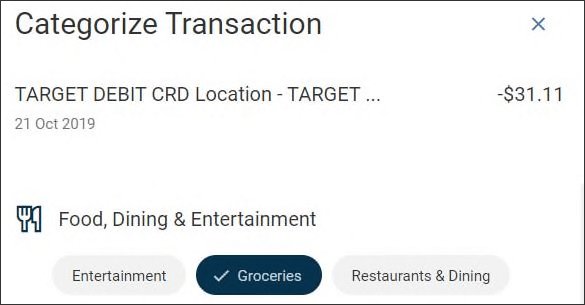
- Click or tap, Save.
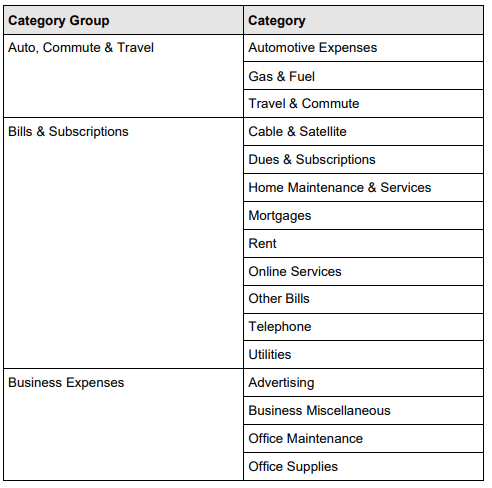
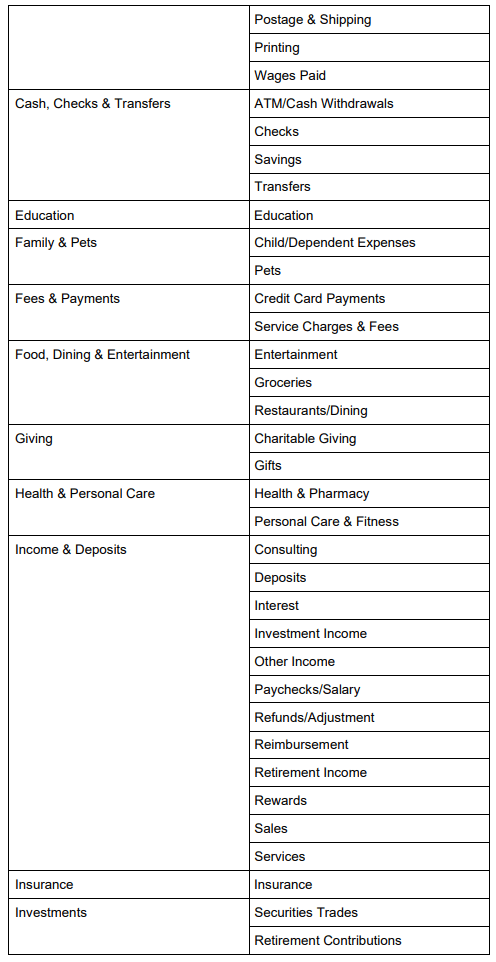
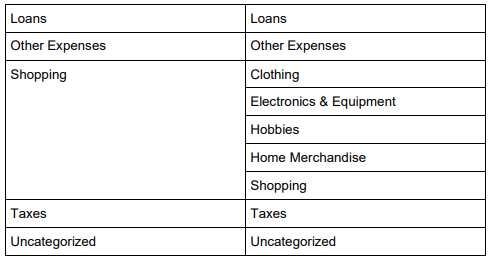
In order to support these new features, we had to deploy a new list of categories for you to use. The new list of categories is below, and through user experience research they have been identified as the most common and applicable to most scenarios:
have the option to select a checkbox in the categorization drawer to apply that selected category to all future transactions
containing the listed description. If the checkbox is selected and the category is saved, any future matching descriptions
will be automatically assigned the selected category.
Note that the entered rule description must be a substring of the original description. In other words, you can remove
characters or words from the front or back of the original description text, but you cannot remove sections from the
middle of the original description or add any characters.
For example, if a transaction’s original description was WALMART SUPERCENTER GULFPORT, MS, you could enter
a substring of “WALMART SUPERCENTER”, but not “WALMART GULFPORT”.
Note: newly established rules are not retroactive and will only apply to future transactions.
transaction description may contain transaction specific data like dates, locations, or numbers. To edit rules with these
descriptions, remove the transaction information that may change in the future. Removing variability in the description will
result in consistent future categorization. For example, “STARBUCKS 4182020” should be edited to “STARBUCKS”.
If you need to edit the description you used as an input for a rule, you can click the edit (pencil) icon to edit
the description. Changes to the description will only impact future transactions.
To remove a categorization rule, you can simply uncheck the checkbox next to the rule and click the Save button in the
categorization drawer to save the change. Changes will only affect future transactions.
the ability to select a category for more specific comparisons.
of categories.
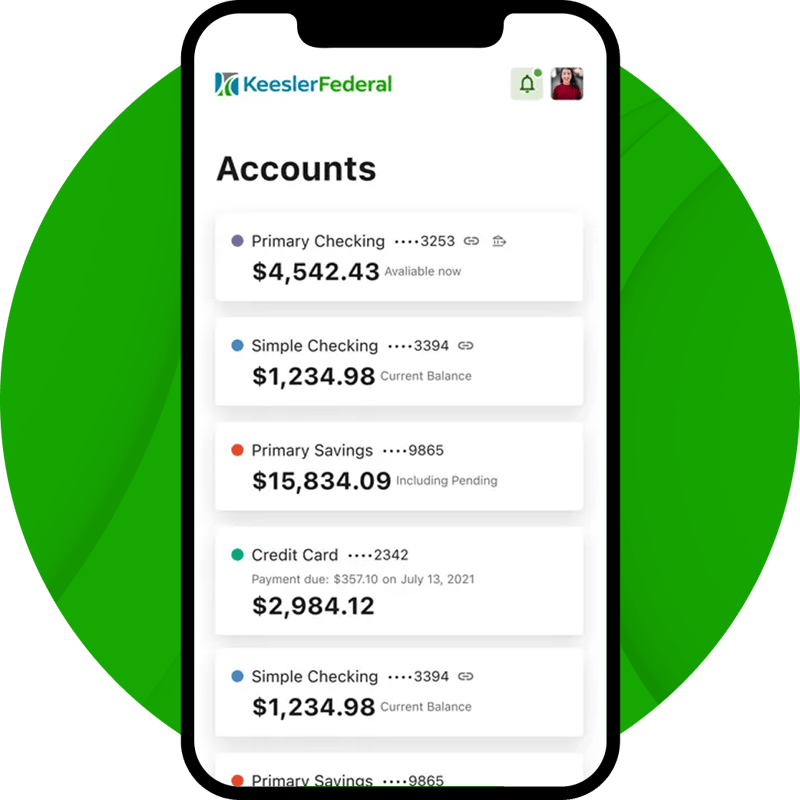
Bank Anytime with the Keesler Federal Mobile App
The Keesler Federal Mobile Banking App lets members securely access accounts, deposit checks, transfer funds, and track everyday spending directly from their phone.
- Securely check balances, move money, and deposit checks from anywhere
- Deposit checks, pay bills, and send money quickly using secure mobile banking tools
- Set up account alerts and track spending to stay in control of your finances
.svg)